Platform

Use cases

Resources

About us

SAMDESK ATLAS: RISK REPORTING & ANALYSIS

Turn incident history into risk-ready plans

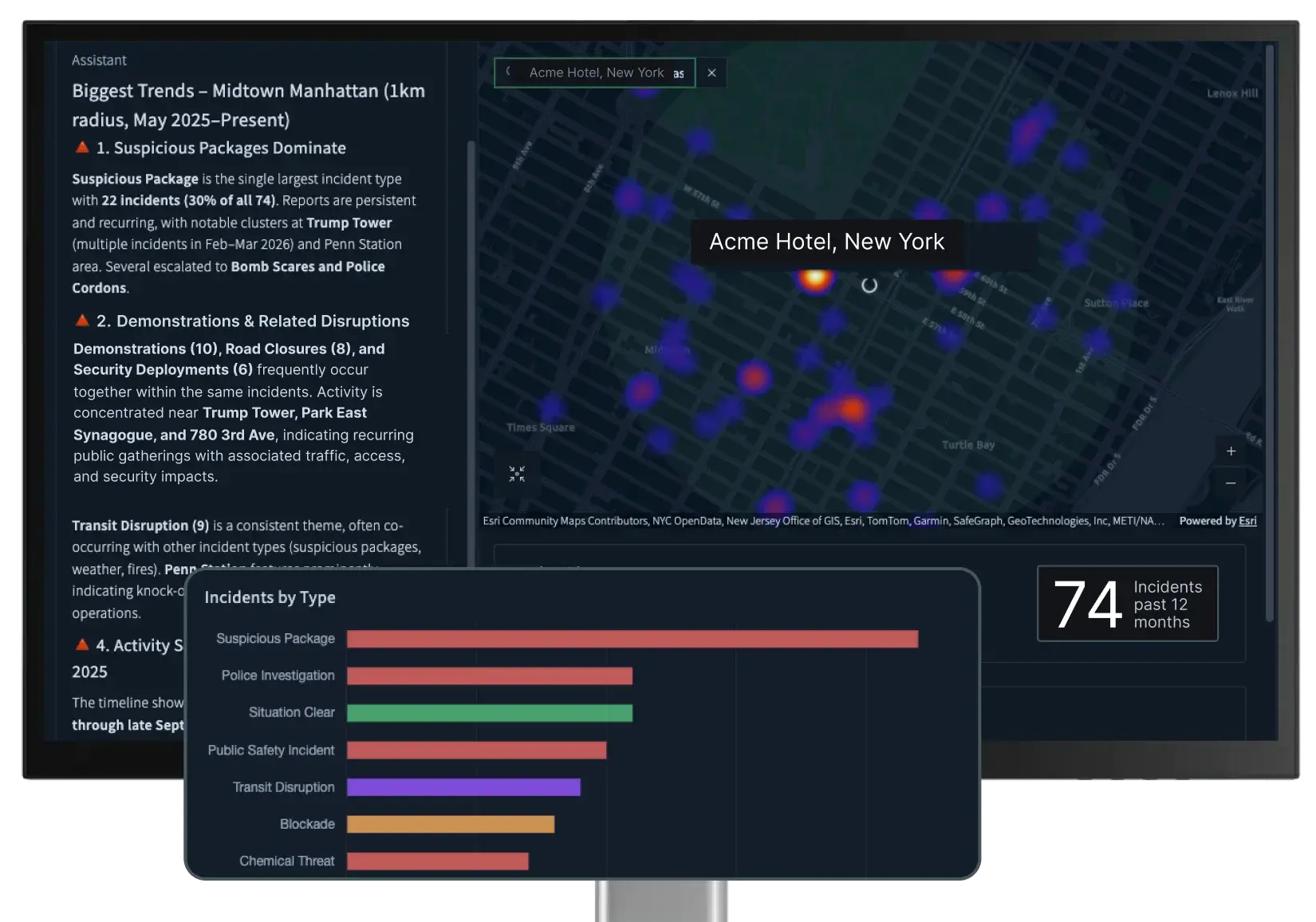
Atlas is a premium all-hazards risk reporting module that helps security and safety teams examine historical incidents, identify patterns, compare exposure, and create decision-ready reports in minutes.

SAMDESK ATLAS: RISK REPORTING & ANALYSIS

Turn incident history into risk-ready plans

Atlas is a premium all-hazards risk reporting module that helps security and safety teams examine historical incidents, identify patterns, compare exposure, and create decision-ready reports in minutes.

Use history to plan your operations with a clearer view of risk.

Real-time alerts show teams what is happening now. Operational planning requires a wider view of what has happened over time.

Atlas turns samdesk incident history into risk reporting teams can use to plan, brief stakeholders, and prioritize with confidence. Before approving travel, selecting a site, preparing for an event, or allocating resources, get answers to questions like:

  • What has happened around this location?

  • Which risks recur, and when?

  • How does exposure compare across sites?

  • Where are conditions changing?

  • What should leadership know or prepare for?

Use history to plan your operations with a clearer view of risk.

Real-time alerts show teams what is happening now. Operational planning requires a wider view of what has happened over time.

Atlas turns samdesk incident history into risk reporting teams can use to plan, brief stakeholders, and prioritize with confidence. Before approving travel, selecting a site, preparing for an event, or allocating resources, get answers to questions like:

  • What has happened around this location?

  • Which risks recur, and when?

  • How does exposure compare across sites?

  • Where are conditions changing?

  • What should leadership know or prepare for?

Assess a location or site.

Review incident history around a hotel, office, venue, or proposed site, then ask plain-language questions to explore what matters.

  • See what happened near a location over a specific period of time

  • Identify recurring risks and time-based patterns

  • Review changes in exposure over time

  • Prepare briefing points for leadership, travelers, or protective teams

Assess a location or site.

Review incident history around a hotel, office, venue, or proposed site, then ask plain-language questions to explore what matters.

  • See what happened near a location over a specific period of time

  • Identify recurring risks and time-based patterns

  • Review changes in exposure over time

  • Prepare briefing points for leadership, travelers, or protective teams

Track trends and create reports.

Analyze incident history across a city, district, route, or operating region, then turn the findings into clear reporting for leadership and planning around: 

  • Executive travel and event briefing

  • Site and location risk summaries

  • Regional risk trend reports

  • Asset and facility exposure reports

  • Leadership and board inquiries

  • Recurring security reports

Track trends and create reports.

Analyze incident history across a city, district, route, or operating region, then turn the findings into clear reporting for leadership and planning around: 

  • Executive travel and event briefing

  • Site and location risk summaries

  • Regional risk trend reports

  • Asset and facility exposure reports

  • Leadership and board inquiries

  • Recurring security reports

Compare exposure and identify patterns.

Review exposure across sites, regions, or assets, then use Atlas AI to surface:

  • Recurring disruption

  • Seasonal or time-based patterns

  • Recent spikes

  • Differences between locations

  • Changes across regions or portfolios

Compare exposure and identify patterns.

Review exposure across sites, regions, or assets, then use Atlas AI to surface:

  • Recurring disruption

  • Seasonal or time-based patterns

  • Recent spikes

  • Differences between locations

  • Changes across regions or portfolios

Built for planning, powered by samdesk incident history.

Atlas extends the samdesk platform with risk reporting and planning capabilities that help teams look back before they move forward.


All-hazards reporting

Examine security, weather, health, transport, and infrastructure incidents in one reporting view.

Location-specific insight

Review incident history around an address, custom boundary, operating region, route, or portfolio.

Current incident history

Use the latest available samdesk incident history to understand recent activity alongside longer-term patterns.

Evidence teams can review

Every finding stays connected to the underlying incident data, so analysts can review the evidence behind each report.


How Nutrien protects operations and ensures business continuity with samdesk.

"Our job isn’t to say no. It’s to give the business confidence to say yes safely. Samdesk helps us do that."

Senior Director of Global Security

How Nutrien protects operations and ensures business continuity with samdesk.

"Our job isn’t to say no. It’s to give the business confidence to say yes safely. Samdesk helps us do that."

Senior Director of Global Security

Featured Resources

Insights for security leaders

Explore our guides, case studies, and research on the latest trends in risk reporting and analysis.

Frequently
asked questions

What is Atlas?

Atlas is a premium all-hazards risk reporting module within the samdesk platform. It helps security and safety teams examine historical incidents, identify patterns, compare exposures, and create decision-ready reports.

Is Atlas a separate product?
Does Atlas detect incidents in real time?
What types of risks can teams review in Atlas?
Who is Atlas for?
How does Atlas use AI?

View your locations in Atlas

Explore incident history across your sites, regions, routes, and assets using the questions your team needs to answer.